
Guide

How to Download Threads Videos Step by Step

Copy the link to the post that holds the video, paste it into the downloader, and save the file your browser offers. Here is the whole process, plus what to check when it does not work.

01 / Overview8 sections

Saving a video from Threads comes down to three moves: copy the link to the post that contains the video, paste that link into a Threads downloader, and save the file you are offered. The details shift a little from one browser and device to the next. This guide walks through the process from start to finish, including how to copy the correct post link, where the saved file actually lands, and what to check when the download does not work as expected.

02 / About

What You Need Before You Start

Threads video download guide title card: the Threads Downloader app tile with a download badge beside the heading How to Download Threads Videos
02 — Paste the link to a Threads post and save the video, with no app to install and no account to sign in to.

Start with the Threads post that contains the video. That sounds obvious, but it is the single detail that decides whether everything after it works, because a profile link and a post link are not the same thing.

A profile link opens someone's account: their bio and a running list of everything they have published. A post link opens one post, the one holding the video you want to save. A downloader reads the URL you hand it and looks for media at that exact address, so a profile URL gives it nothing specific to fetch. This is the most common reason a download fails before it has really begun.

Everything else is ordinary. You need a browser and an internet connection, and that is the full list. There is no app to install and no account to create. Because the tool works from the link alone, you never have to go looking for the video a second time once its URL is on your clipboard.

One habit saves most of the trouble: copy the link from the post itself using the share control, rather than typing or trimming an address by hand. A freshly copied link is complete and correctly formed, while an edited one often is not.

03 / Steps5 steps

How to Download Threads Videos in Five Steps

The procedure is the same on a phone and on a computer. Work through it in order, and pay particular attention to the second step, because a good link is what everything after it depends on.

  1. Step 01

    Open the individual Threads post that contains the video, rather than staying on the creator's profile or watching the clip as it scrolls past in your feed.

  2. Step 02

    Use the sharing options on that post to copy its link. If it came from a message, delete the words around it so only the URL remains.

  3. Step 03

    Open the Threads downloader on this site and paste the copied post URL into the input field provided for Threads links.

  4. Step 04

    Submit the link using the control the tool shows. If the link is supported and the post is accessible, the available download result appears for that post.

  5. Step 05

    Save the video option you are offered. Your browser may save it straight away, ask you where to put it, or open the video in a new tab first.

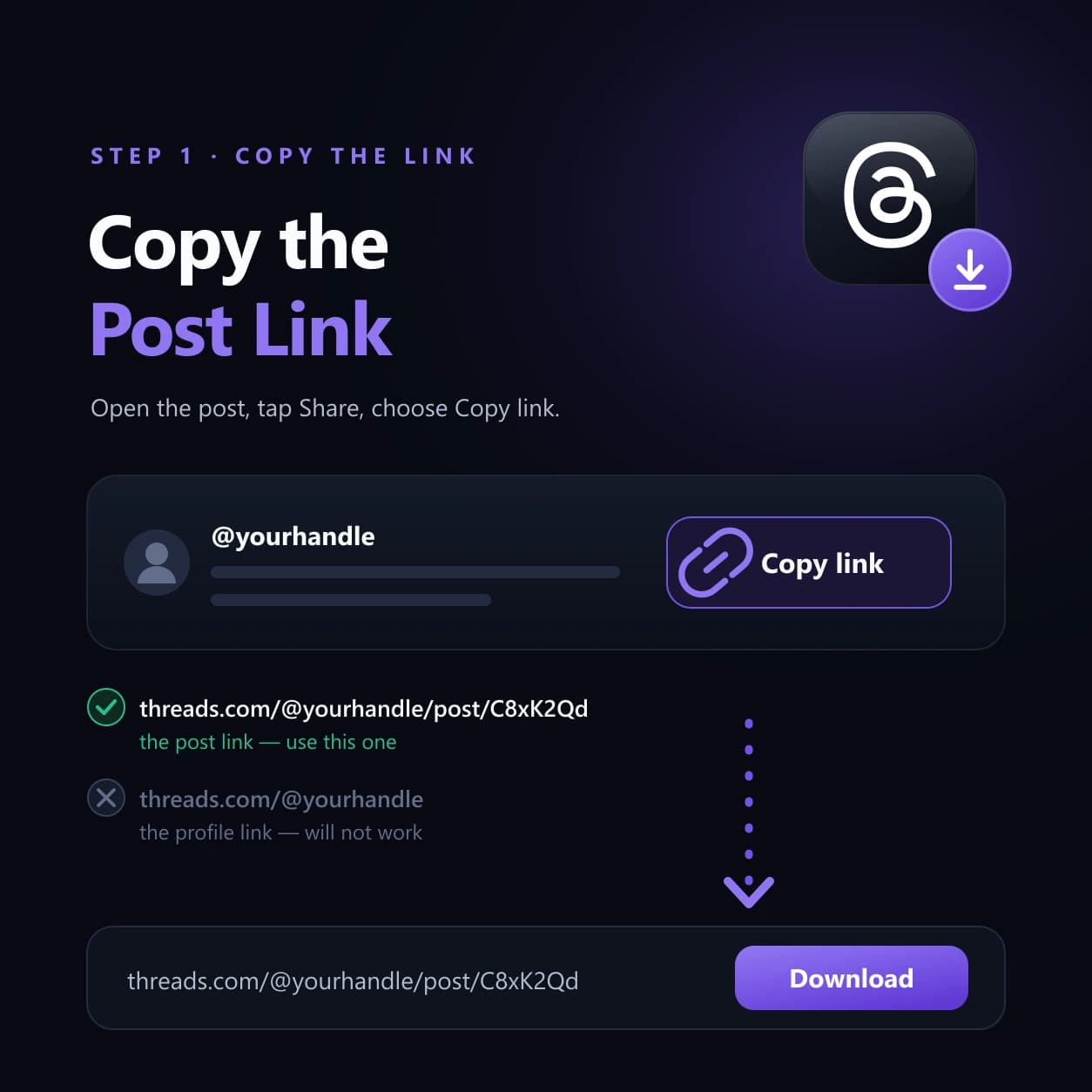
Copying a Threads post link: a share row with Copy link, a post URL ticked as correct and a bare profile URL crossed out, then the link pasted into the downloader
03 — The share control returns a post URL ending in /post/; a bare profile URL has no video at that address and will not download.
04 / Guide4 records

Where the Downloaded Threads Video Is Saved

The save location is decided by your device and browser settings, not by this site. We hand the file to your browser and your browser chooses the destination. If the video is not where you expected it, check the places below before deciding that the download failed.

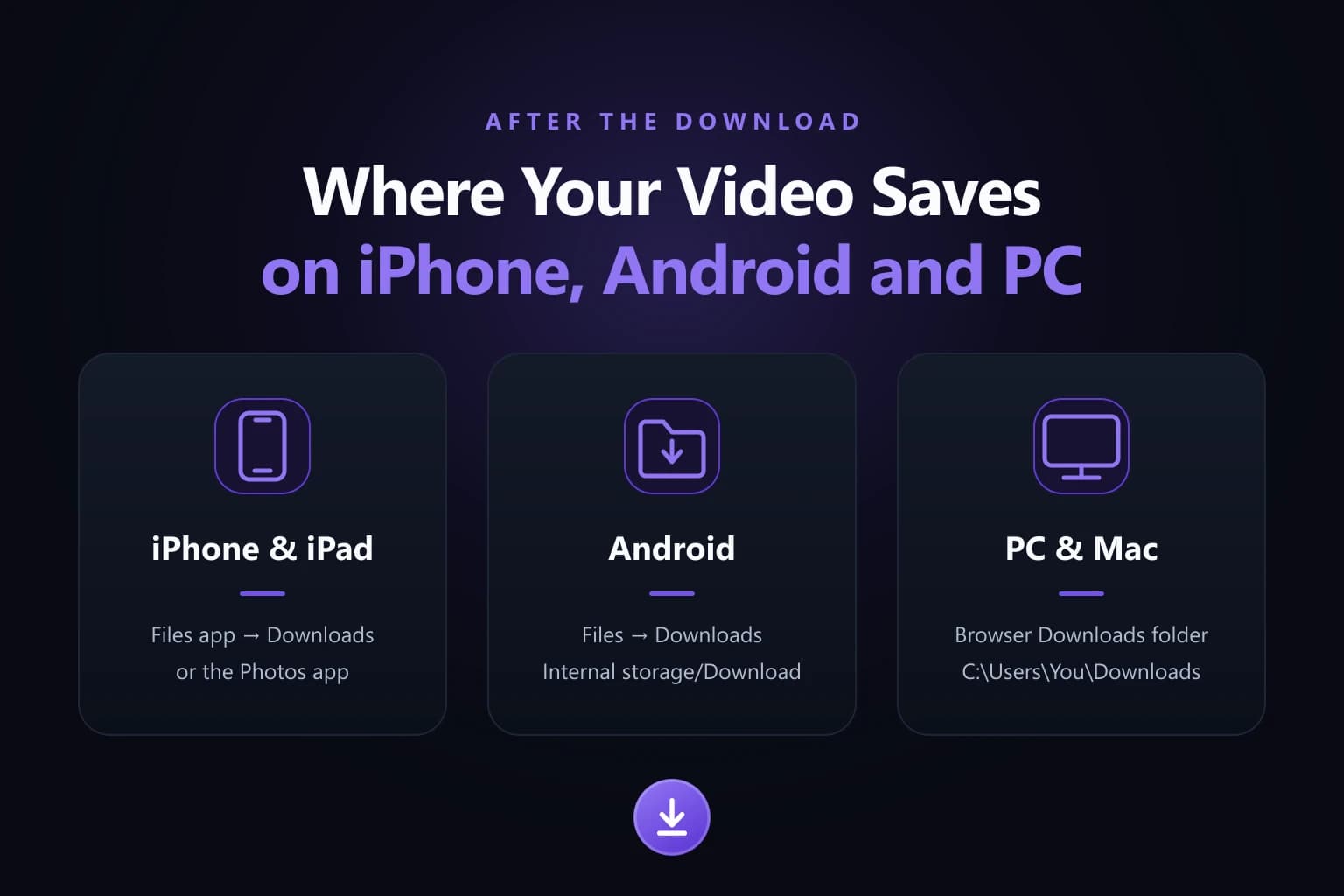
Where a downloaded Threads video is saved on iPhone and iPad, on Android, and on PC and Mac, shown as three device cards
04 — Your browser picks the destination: the Files app on iPhone, the downloads list on Android, and the Downloads folder on PC and Mac.
01

iPhone and iPad

Safari downloads are normally found in the Files app. Apple points people to the Downloads folder when they go looking for something saved from the internet. If the video is not in Photos, open Files and check there before assuming the download did not work.
02

Android

Look in your browser's downloads section first, then in the device file manager. The exact folder, and whether the video appears in the Gallery on its own, varies with the device and the browser settings you have in place.

03

Windows

Check the folder your browser is set to use for downloads, which is usually the Downloads folder. If you picked another location, or turned on the setting that asks you each time, the file is wherever you sent it.

04

macOS

The same rule applies on a Mac: the file goes to the browser's configured download location, normally the Downloads folder. It will be somewhere else only if you changed that setting or chose a different folder when prompted.

05 / Support5 records

Why a Threads Video May Not Download

When the process fails, check the source post before submitting the same link over and over. The best single test is to open the copied URL in a signed-out or private browser window. If the post will not load for a signed-out visitor, an external downloader cannot reach it either.

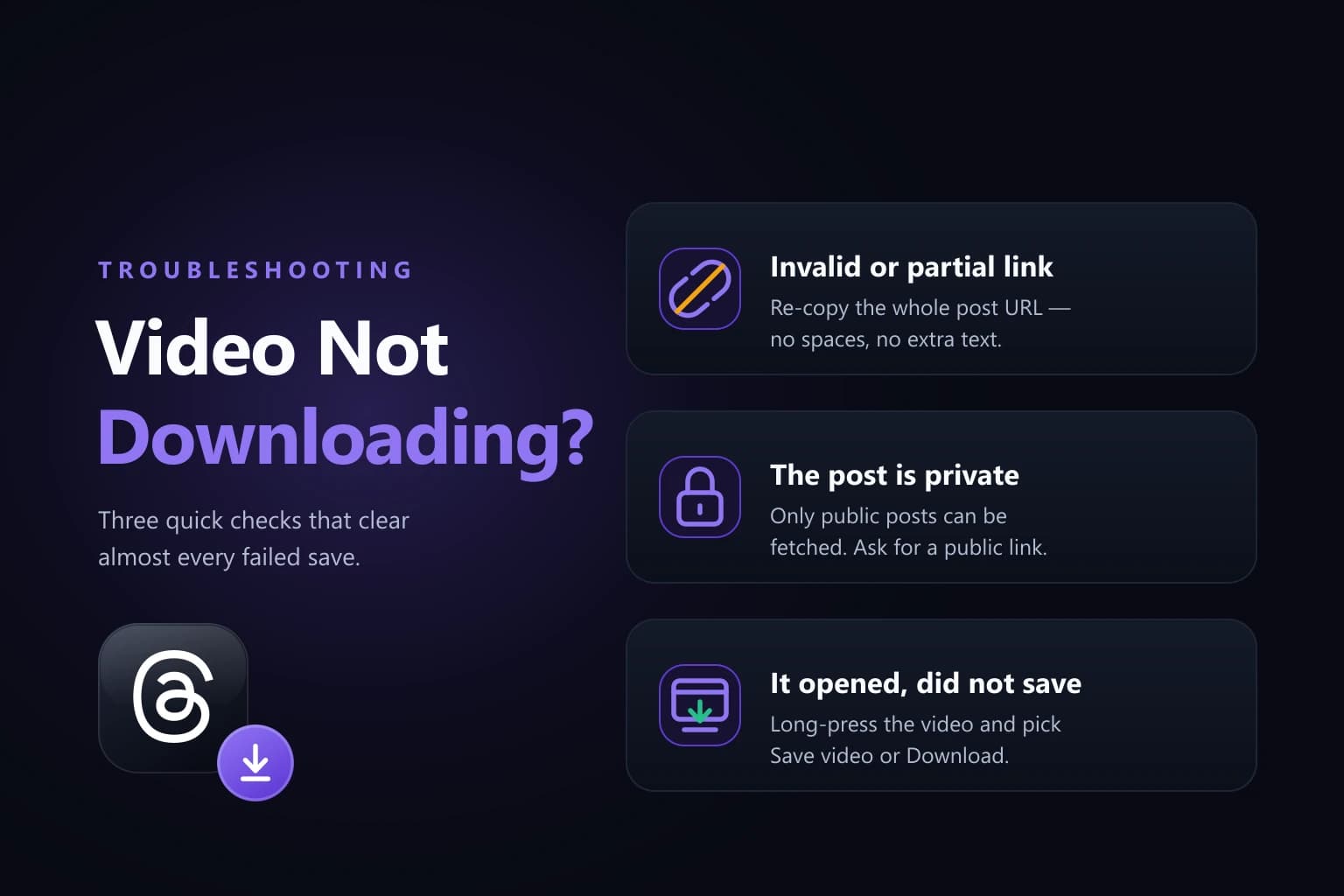
Three fixes for a Threads video that will not download: an invalid or partial link, a post that is private, and a video the browser opened instead of saving
05 — Almost every failed save is one of three things: a partial link, a post that is not public, or a video the browser opened in a tab.
01 / Problem

The URL points to a profile rather than the post

Solution
  • Open the individual post first, then copy its link from there. A profile URL stops at the username and holds no single piece of media to fetch.
  • Read the address before you paste it. If it looks like an account page rather than one post, it is the wrong link.
  • Copy a fresh link from the share control instead of editing an address by hand.
02 / Problem

The copied link carries extra text around it

Solution
  • Remove the surrounding words. If the clipboard holds something like 'Watch this: link', delete everything except the URL itself.
  • Check that nothing was cut off the end, because a truncated link fails in exactly the same way as a wrong one.
  • If you are unsure what was copied, return to the post and copy the link again from the sharing options.
03 / Problem

The post has been deleted or is no longer available

Solution
  • Open the URL in a normal browser tab. If Threads itself cannot show the post, no downloader can retrieve the video from it.
  • Ask whoever sent you the link whether the post is still up, since the creator may have removed the post or the whole account.
  • Look for the same video in a repost or a newer post, and copy that link instead.
04 / Problem

The post is restricted rather than publicly accessible

Solution
  • Open the copied URL in a signed-out or private window. If it does not load there, the post is not publicly reachable and the tool cannot fetch it.
  • Remember that a post you can see as an approved follower of a private account is still closed to a web tool, which has no access to your session.
  • Nothing here bypasses privacy settings. If you need the file, ask the person who posted it to send it to you.
05 / Problem

The browser opens the video in a tab instead of saving it

Solution
  • Use your browser's own save or download control on that tab rather than starting the whole process again.
  • On a phone, press and hold the playing video and choose the save or download option your browser offers.
  • On a computer, right-click the video and choose the save option, or check the downloads list in case the file has already arrived.
06 / Access

Public and Private Threads Posts

Public accessibility matters more than most people expect. A web downloader processes the link you give it and nothing else. It does not inherit access from your personal Threads session, because it never sees that session in the first place.

So you can be signed in, approved to follow a private account, and watching the video without any difficulty, and still find that pasting its link produces nothing. That is not a broken link or a broken tool. The post was only ever reachable inside your authenticated session, and an unrelated web tool sits outside it.

Meta describes public Threads content as accessible more broadly, while private profiles restrict interaction and access to approved followers. There is no way around that here, and we would not offer one. If a post is restricted, the honest answer is that an external downloader should not be expected to open it, and the way to get the file is to ask the person who posted it.

07 / Quality

Video Quality, Format and Watermarks

What you get back depends on the media that comes from the source post and on the output the downloader supports for it. Do not assume that every video will be available in 4K, 1080p, MP4 or any other specific quality or format unless the download option for that post confirms it.

The reason is straightforward: a downloader cannot recover detail that is not present in the available source media. If a clip was uploaded at a modest resolution, that resolution is the ceiling, and no tool can add sharpness that was never recorded in the first place.

The phrase 'without watermark' deserves the same care. A downloader that adds no branding of its own is doing something quite different from removing text, logos or graphics that are already part of the video itself. Marks burned into the picture belong to the file and come down with it.

One more point is worth being clear about. Saving a video file is a long way from having permission to reuse that video. A public post is not automatically free for anyone to republish, edit or use commercially, and public is not the same as public domain. If a video belongs to someone, copyright and other rights still apply to it after it reaches your device.

08 / FAQ8 entries

Threads Video Download FAQs

The questions that come up most often when a Threads video will not save.

01Can I download a video from Threads?

Yes, when the post is accessible and the downloader supports that link and media type. Copy the URL of the individual post, paste it into the tool on this site, and save the video it makes available. Everything happens in a browser tab, so there is nothing to install before you start.

02Do I need the Threads app to download a video?

No, not for the browser-based method described here. You need two things only: the link to the post and access to the web downloader. Copy the link inside the Threads app if that is where you found the video, or copy it from Threads open in a browser tab. Either one works.

03Do I need to log in to a downloader?

No, and you should be wary of any site that asks. Downloading a public post needs no credentials at all. A great many people search for a thread downloader in the singular and land on services that request a Threads or Instagram password. Never hand one over: a password gives away the entire account, and no public download requires it.

04Can I download a video from a private Threads account?

You should not expect a web downloader to bypass private-account restrictions, and this one does not. A post visible only to approved followers sits behind an authenticated session that an outside tool cannot use. If the link will not load in a signed-out window, no downloader can reach it. Ask the person who posted it instead.

05Why does my Threads video open instead of downloading?

Because some browsers display a video file in a new tab rather than saving it immediately. Nothing has gone wrong and the link is fine. Use the save or download control your browser offers on that tab: press and hold the video on a phone, or right-click it on a computer, then choose the save option.

06Where did my downloaded Threads video go?

Check your browser's downloads area first, since that is where the file is recorded on every device. On an iPhone or iPad, also open the Files app and look in the Downloads folder, because a video saved from Safari does not always appear in Photos. On Android and desktop, check the browser's configured download location.

07Why does the downloader say my Threads link is invalid?

Usually because the URL points to a profile rather than a post, is incomplete, or uses a link format the tool does not currently support. Return to the original Threads post and copy a fresh link rather than editing the address manually. People who arrive here after searching for a threads video downloder that works almost always find the link was the real problem.

08Is downloading a Threads video legal?

That depends on the video and on what you do with it, and nothing here is legal advice. Saving a file is not the same as being allowed to reuse it. A public post is not public domain, and copyright can still apply to it. Keeping a clip for personal offline viewing sits in a different place from republishing, editing or selling it.

09 / Summary

Download the Video Using the Correct Post Link

Open the individual Threads post, copy its link, paste that URL into the downloader on this site, and save the video with your browser. That is the entire procedure, and downloads that work are doing exactly this and nothing more.

When one fails, work through it in the same order. Check the link first: is it a post rather than a profile, and is it complete? Then check whether the post is reachable at all by opening it in a signed-out window. Then check how your browser handled the file, because a video that opened in a tab has not failed, it simply has not been saved yet.